
Those of you who have been in the technology world for a while may remember a product called WhatsUp Gold. Well, it never really died, it has kind of been there this whole time and improved tremendously. When I started my IT career I used WhatsUp Gold to monitor site data. We had small remote stores connected via MPLS and needed a way to monitor performance and uptime. Also needed a way to monitor vendor websites to try to be proactive. It worked well for this. But wow over the last 12 years, it really has changed. I was asked to do a review on the product now. So let’s jump into this thing.
In the early days WhatsUp Gold has always been a basic monitoring tool with an amazing self-explanatory user interface, but today many things have changed. It’s an in-depth tool to help you with all your monitoring needs, and more, all keeping an amazing easy-to-use user interface. WhatsUp Gold has an Interactive Demo that is great! It can be found here. Alternatively, if you want to install the product and take it for a whirl for 14 days you can go here.
First Impressions jumping back in. From the first look of the Interactive Demo, you are shown a decent customizable “Home Dashboard” that most of the things are clickable. 
You can click on an object say Down devices. You can click on the 86 below and it will show a network map of the devices

But if you go to click on the “Device Role” Pie chart….Nothing other than it moves the piece of the pie out a bit. This would be one nice thing to fix, is to make this clickable and bring you into your Router devices if you click on it.

Moving on, from there, that is the only little thing I have found as of writing this.
Key Features:
- Application Monitoring
- Automated Discovery
- Bandwidth Monitoring
- Cloud Monitoring
- Configuration Management
- Distributed Monitoring
- Failover Manager
- Flowmmon NPMD/NDR
- Log Management
- MSP Monitoring
- Network Mapping
- Rest API Monitoring
- Server Monitoring
- Traffic Monitoring
- Virtualization Management
- Wireless Monitoring
Let’s touch on a few of the features.
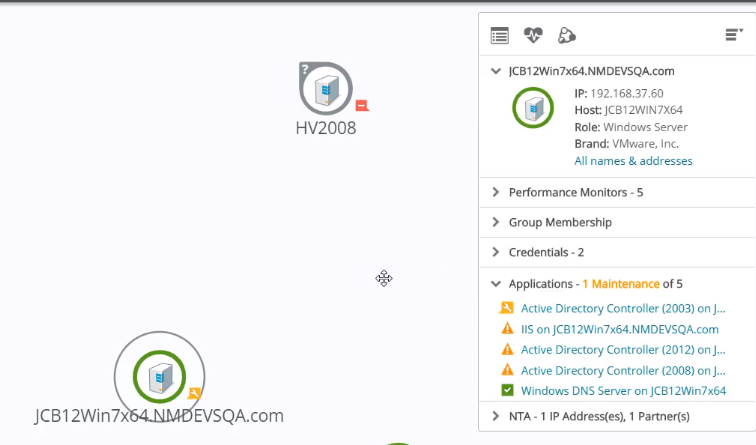
Application Monitoring had me impressed at the beginning. not only are you monitoring the devices involved, but also monitoring the applications from end to end. In the below example just picking the device in the network map shows the application status in the details card.
Cloud Monitoring: Like most of you out there I am spending more and more time in different cloud environments. Sometimes just one, but for some reason, I keep bouncing around amongst many. Well good news, WhatsUp Gold can monitor all the stats out of there also. If you are using AWS or Azure, any of the stats that can be monitored can be!

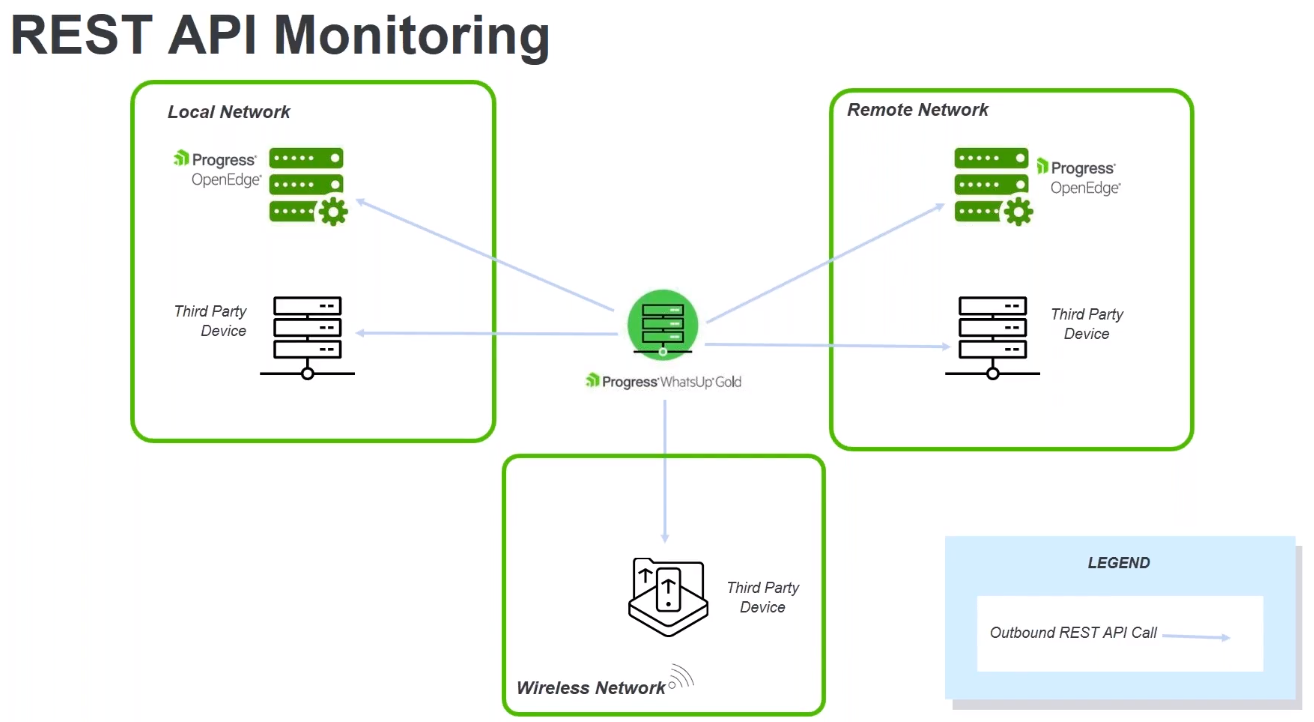
Rest-API monitoring: This one really stands out to me. And seems to be a growing trend. There are so many SAS products out there that have API’s but no real way to monitor if things are working. So you are relying on the SAS vendor to let you know well Application x died today. Well with the RestAPI you can for sure tell when the application went down, and how long. Not to mention gather additional metrics. A good example is if you are using Duo for MFA auth, well and it goes down, that could cause a real impact. Now you can monitor the Duo auth service with RestAPI and proactively alert the users that there is an ongoing issue with Duo MFA auth.
Automated discovery, This has to be the simplest thing to do, Just give it an IP range and tell it to search connected networks and it’s off to find all the things. You just sit back and wait and add some info to discovered devices.
One thing that WhatsUp Gold has always fallen a bit short on in the past was reporting. It was never really robust, but now things are quite a bit different. It’s not completely customizable, but there are many out-of-the-box reports from Asett Inventory to Software Update reports.

Conclusions: After taking a refreshed look at WhatsUp Gold I’m quite impressed by their progress over the years. Yes in the past only had a small use-case, but now looking at this now the progress is just elegant and has added tons of functionality. I’m quite impressed with its out of box solution.
If you are interested in more please follow the link below for an On-Demand demo!
On Demand Demo
And for an interactive demo follow the link below:
Interactive Demo
While the opinions in this article are my own and are not related to the company I currently work for. This blog post was sponsored.


 childebrandt42