
Working with a customer this week they brought up a unique issue with Apps on Demand not working after service account password change. The customer stated that they had changed the password on the account and found that it had issues with attaching apps on demand. Well, they went and looked at App Volumes manager and saw errors in Activity Log like below.
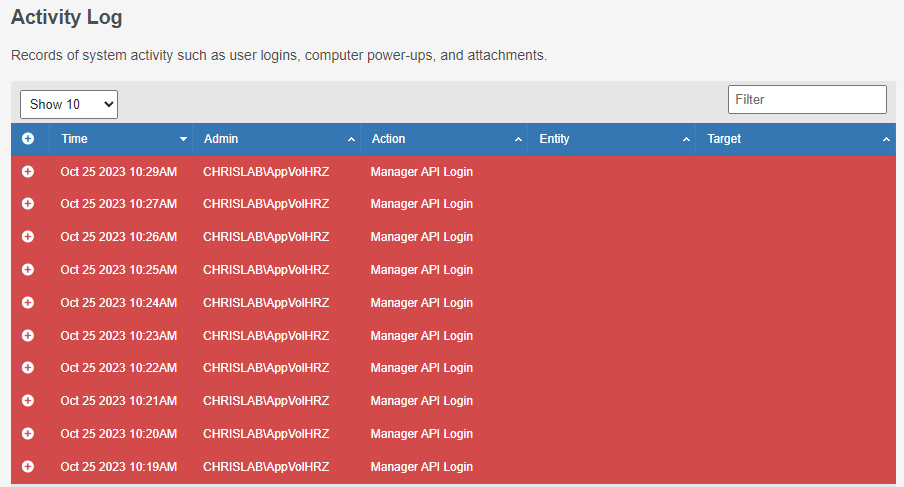
They went into Horizon admin portal and went to check servers and App Volumes and went to update the Account password. But ran into issue when updating the password. When you open the Edit and enter the updated password it will give you this error: “Unexpected Error occurred while trying to access App Volumes Manager.”

This would not allow you to update the password. Well with trial and error figured out the only way you can update the password is to do the following. Yes its painful!!!!!
- Remove all App Volumes Apps from Horizon Apps.
- Unassociate App Volumes Managers from Farm.
- Then you can update the password.
- Rebuild all the stuff you just removed!
Now that you have updated the password you can now RE-ADD ALL THE APP VOLUMES APP’s back again! Yes, I know, do all the work again! And then go back through and Global Entitlements and RE-ADD ALL THE LOCAL POOLs back!
So, what to take away from this? Well Don’t change password or don’t disable the account as it will break everything!
Additionally on thing you can do without doing all the App on demand over again, you can just update the password to the original password in AD, and then restart the App Volumes manager, and it will clear out the issue.


 childebrandt42