Category: CLI and Powershell
-

Cracking the Code: Navigating VMware’s Lack of API Documentation for App Volumes – One Victory at a Time
This post contains an overview of various App Volumes APIs not documented by VMware, along with examples of PowerShell code to use them. The post includes commands for connecting to the App Volumes server, accessing inventory, directories, infrastructure, and more. The author also provides a link to GitHub for the full code.
-

Unleashing the App Volumes 4.x API via Edge or Chrome, Empowering Operations with PowerShell
This article provides an updated guide on using Chrome or Edge for App Volumes APIs, including PowerShell, developer tools, and REST methods. It covers discovering, launching sessions, getting version data, working with online entities, and managing storage groups, applications, and user assignments. The author also shares insights on navigating the developer tools.
-

As Built Report for VMware App Volumes updated for 2309
As promised over the last few weeks i have been working on the App Volumes report. Well, it’s finally done! You can get it live >>>>> AsBuiltReport/AsBuiltReport.VMware.AppVolumes (github.com) What is in the update, Well a bunch of things as you can imagine. It has been updated to support App Volumes 2309 and below. I have…
-

As Built Report for VMware Horizon Updates
Long awaited updated to the VMware Horizon As Built Report
-

As Built Report’s for the Horizon Suite
Last year I met some amazing people I was able to meet Tim Carman and Matt Allford while in Australia speaking. They introduced me to a project they had been working on. A project called As Built Report, this was an automated way to document your environment. When I looked at it, I was hooked…
-
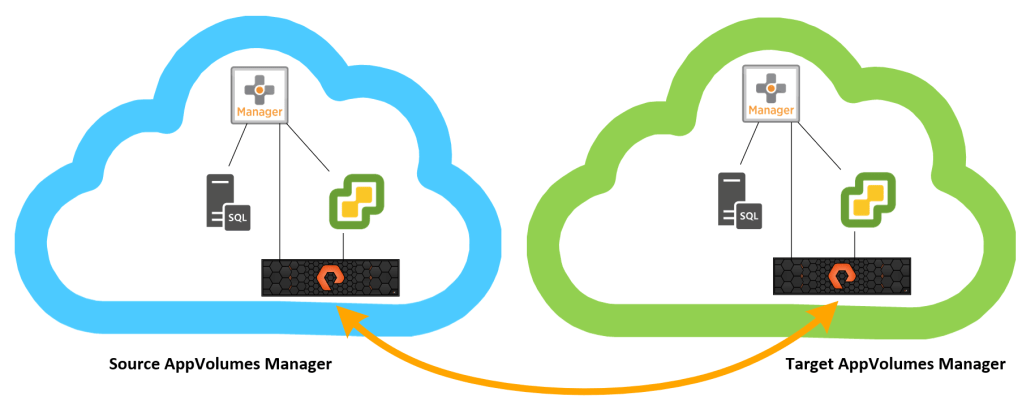
AppVolumes 4.x Application Replication
t to replicate AppVolumes 4.x Applications, Packages, Assignments, and lifecycle status from one site to another with help of Pure storage?
-

Using PowerShell to automate file adds to Teams and SharePoint online
Using PowerShell to add files to Teams site.
-

Using Windows Credential Manager with Powershell.
I have been having trouble for a while dealing with credentials and how to store them when using them in scripts. I have done the whole just do Get-Credential and enter it every time I run the script but that is a great for one off scripts but not for scheduled tasks. In the past…


 childebrandt42